
Datadog is a cloud monitoring and observability platform that helps businesses monitor applications, infrastructure, and logs in real time. Integrating Datadog with AWS allows organizations to gain deeper visibility into cloud resources such as EC2, RDS, Lambda, and containers, helping improve performance, reduce downtime, and optimize cloud costs.
In this guide, you will learn:
- What Datadog is
- Why Datadog matters for AWS monitoring
- How Datadog AWS integration works
- Two methods for setup
- Key benefits of Datadog cloud observability
Introduction
As organizations increasingly migrate to the cloud, the need for robust Datadog monitoring and analytics becomes more important than ever. Modern cloud environments generate massive amounts of operational data, making it difficult to manually track performance across multiple services.
This is where Datadog, a leading cloud monitoring and observability platform, becomes essential. It helps businesses gain deeper visibility into infrastructure, applications, and network performance from a single dashboard.
This article explains what Datadog is, how Datadog AWS integration works, and why combining Datadog with AWS can improve cloud visibility, performance monitoring, and operational efficiency.
Also read : https://www.cloudzenia.com/case-studies/how-addly-ai-scaled-content-generation-and-decreased-latency
What Is Datadog?
Datadog is a cloud monitoring and observability platform designed to collect and analyze data from servers, applications, databases, and cloud services. It centralizes performance metrics into a single dashboard, allowing IT teams to detect issues quickly and maintain healthy infrastructure.
Instead of checking multiple monitoring tools separately, organizations can use Datadog to view their entire environment from one platform. This improves troubleshooting and reduces the time required to identify root causes.
Datadog is widely used for monitoring:
- Infrastructure performance
- Application health
- Log data
- Network activity
- Security events
Because of its real-time analytics capabilities, Datadog helps organizations become more proactive rather than reactive.
Also read : https://www.cloudzenia.com/case-studies/v500-knowledge-management-platform
Why Datadog Matters for AWS Environments
AWS provides a wide range of services that help businesses scale quickly, but managing those services can become complex. As cloud environments grow, teams often struggle to maintain visibility across multiple AWS resources.
Datadog simplifies this process by connecting directly with AWS services and collecting performance data automatically. Once integrated, it can monitor services such as Amazon EC2, Amazon RDS, AWS Lambda, Amazon ECS, and Kubernetes clusters.
This allows organizations to:
- Detect performance issues faster
- Reduce service interruptions
- Improve cloud cost visibility
- Strengthen security monitoring
With a single monitoring platform, teams can understand how AWS resources interact and where improvements are needed.
Also read : https://www.cloudzenia.com/case-studies/migration-monolithic-ec2-architecture-scalable-aws-ecs-crowdbuzz
How Datadog AWS Integration Works
Datadog integrates with AWS by connecting to your AWS account and collecting data from CloudWatch and other AWS services. Once the connection is established, Datadog begins importing metrics, events, and logs into its dashboard.
The platform can then display infrastructure health, resource usage, and performance trends in one place. This helps teams understand whether workloads are operating efficiently and whether cloud resources are properly sized.
There are two common ways to integrate Datadog with AWS:
Manual Setup
The manual method requires creating IAM roles and granting Datadog permission to access AWS resources. This provides more control over configuration, but it can take longer to set up correctly.
CloudFormation Setup
The recommended approach is using Datadog’s default CloudFormation template. This method automates the setup process and reduces the risk of configuration errors. Once the template is launched, the AWS account becomes ready for monitoring with minimal manual work.
Step-by-Step Datadog AWS Integration
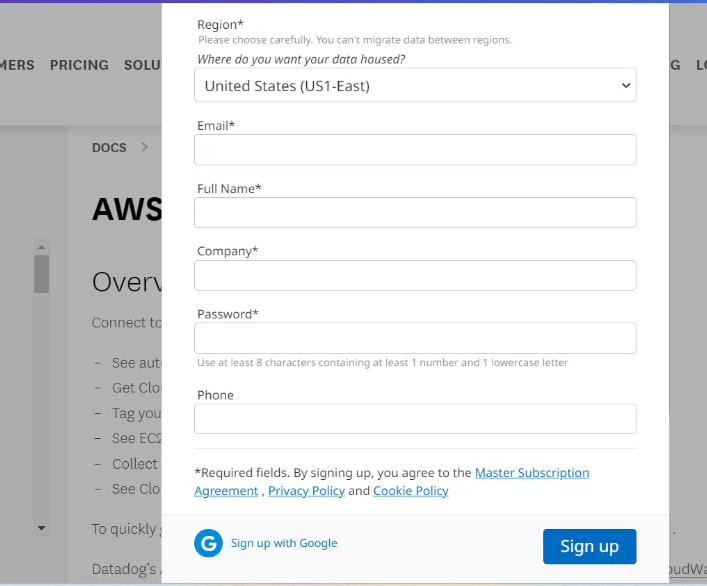
Step-1: Create Your Datadog Account
Visit the Datadog website and create your free account by entering:
- Email address
- Full name
- Company name
- Password
- Phone number
Choose the preferred data hosting region before completing signup.
Step 2: Connect Your AWS Account in Datadog
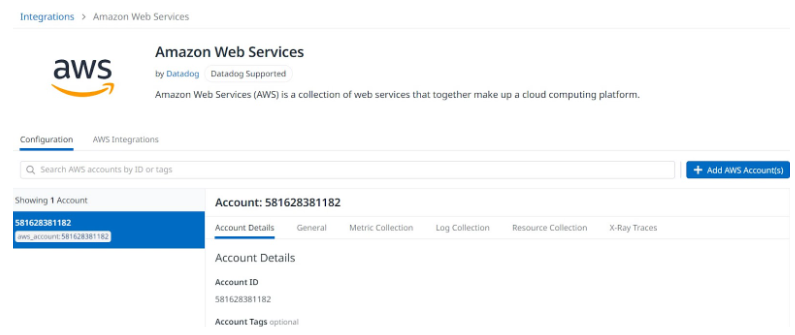
After logging in to Datadog:
Need help with your cloud infrastructure?
Our experts at CloudZenia are ready to help you build, scale, and secure your setup.
Book a Free Consultation- Open the Integrations section
- Search for Amazon Web Services
- Select AWS Integration
- Add your AWS account
- Enter your AWS account details
- Configure metric collection settings
This allows Datadog to start reading AWS CloudWatch metrics.
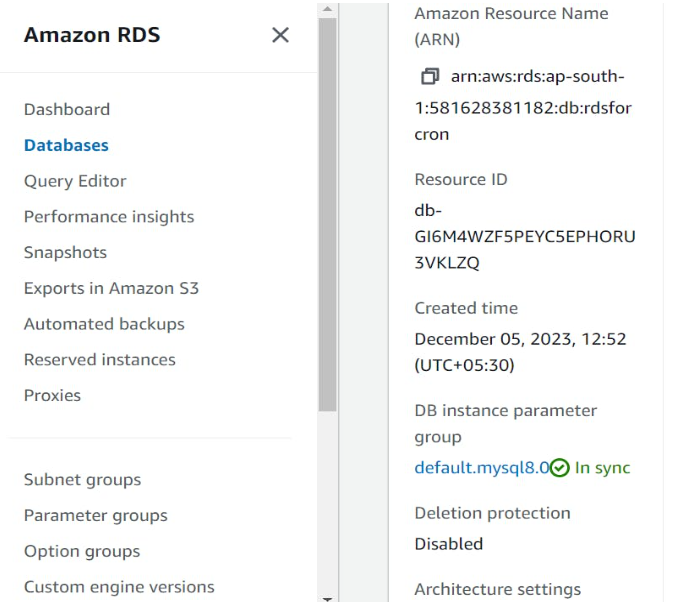
Step 3: Verify the AWS Resource ID
Go to your AWS console and open the resource you want to monitor, such as an RDS database.
Check the:
- Resource ID
- Instance name
- Region
- Configuration details
This helps confirm that the correct AWS resource is linked with Datadog.
Step 4: Confirm Metrics in Datadog
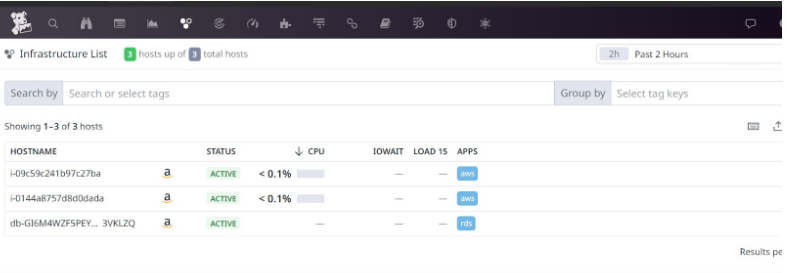
After setup is complete:
- Open the Infrastructure section in Datadog
- Locate the synced AWS resources
- Verify that metrics appear for:
- EC2 instances
- RDS databases
- Other AWS services
You should now see live performance data in the Datadog dashboard.
Final Result
Once integration is completed, Datadog helps you monitor:
- CPU usage
- Memory utilization
- Database performance
- Network traffic
- Service health
This gives your team better visibility into AWS performance and simplifies cloud monitoring.
Benefits of Datadog for AWS Monitoring
One of the biggest advantages of Datadog is its ability to provide a unified view of your cloud environment. Instead of switching between different AWS consoles, teams can access everything from a single interface.
Datadog also improves operational efficiency by reducing troubleshooting time. Real-time alerts notify teams when performance thresholds are exceeded, allowing faster response.
Additional benefits include:
- Better cloud cost optimization
- Faster incident resolution
- Improved security visibility
- Stronger performance insights
Over time, this leads to better cloud reliability and lower operational overhead.
Common Challenges During Setup
Some organizations encounter issues during setup, especially when permissions are not configured properly. Missing IAM roles or incorrect API keys can prevent metrics from appearing in Datadog.
Another common challenge is delayed visibility of AWS resources. In some cases, CloudWatch data may take a short time to appear after integration.
Most setup issues can be avoided by carefully following Datadog documentation and verifying permissions before deployment.
Datadog vs Native AWS Monitoring
AWS CloudWatch offers basic monitoring, but Datadog provides a broader observability platform. CloudWatch is useful for individual AWS services, while Datadog delivers cross-service visibility and deeper analytics.
Datadog becomes especially valuable for organizations running complex or multi-cloud environments where a single monitoring dashboard can save time and improve decision-making.
Conclusion
Datadog helps organizations gain better control over cloud infrastructure by providing real-time monitoring, analytics, and observability. When integrated with AWS, it becomes easier to monitor performance, reduce downtime, and optimize cloud resources.
For businesses looking to improve cloud operations, Datadog AWS integration can be a valuable step toward stronger visibility and more reliable infrastructure.
For more cloud monitoring insights and implementation support, visit CloudZenia and explore new possibilities in cloud management.
Filed under