
Introduction
Kubernetes has transformed the way organizations deploy, manage, and scale modern applications. As businesses increasingly adopt cloud-native technologies, Kubernetes has become the de facto standard for container orchestration, helping teams automate application deployment, improve resource utilization, and maintain high availability across environments. Its ability to handle complex workloads at scale has made it a critical part of modern DevOps and platform engineering strategies.
However, while Kubernetes offers tremendous flexibility and scalability, managing Kubernetes clusters becomes increasingly challenging as environments grow. A single cluster can contain hundreds of pods, services, deployments, ConfigMaps, and other resources, all working together to support business-critical applications. When something goes wrong, identifying the root cause is rarely straightforward. DevOps engineers often need to navigate through multiple resources, inspect logs, analyze metrics, and review configurations before they can pinpoint an issue.
Why Kubernetes Management Gets Complicated
Explain how DevOps teams often need to check logs, metrics, deployments, and configurations separately. Mention that constantly switching between multiple kubectl commands slows down troubleshooting and increases operational overhead.
What is Kubebox?
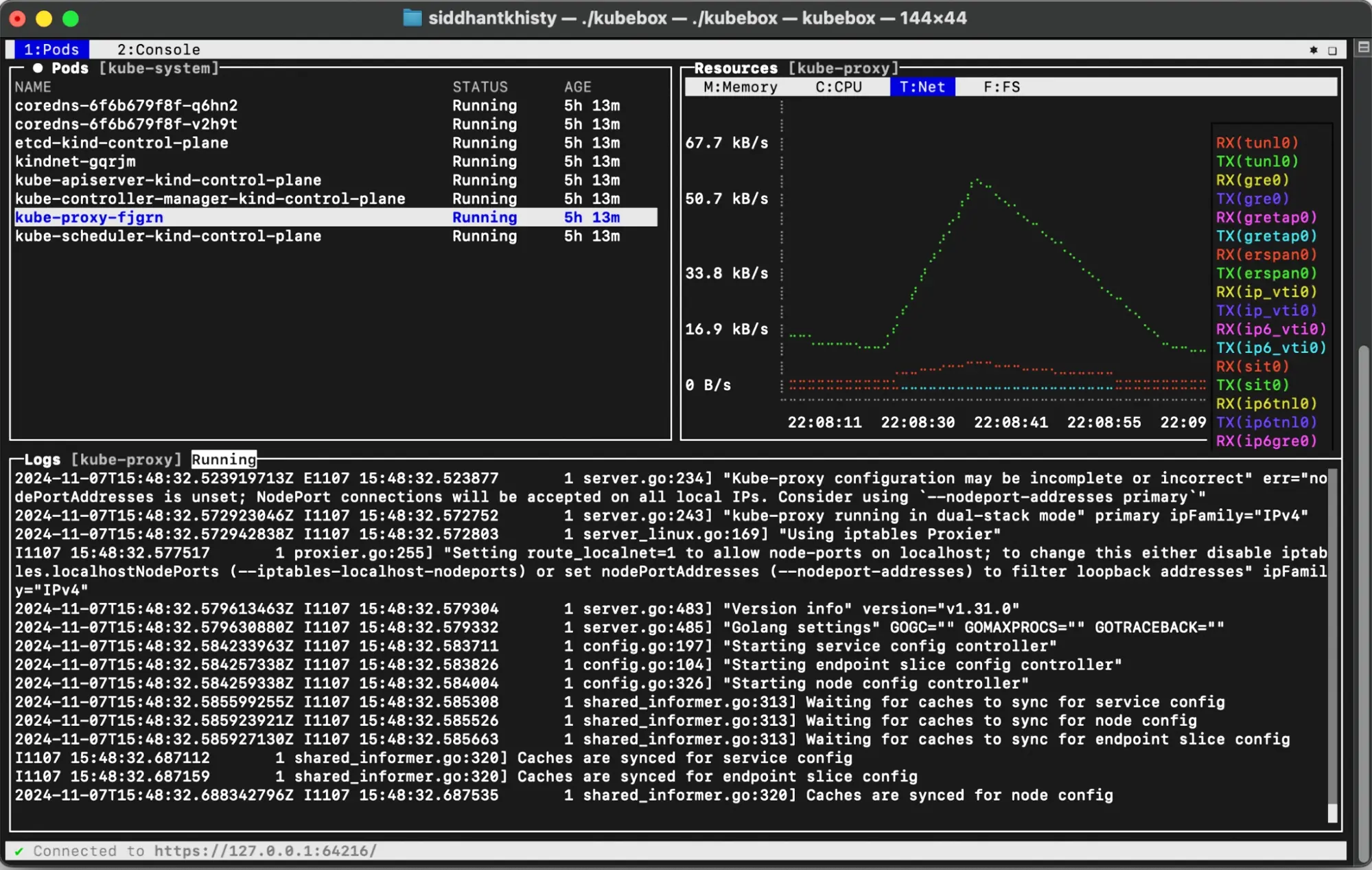
Describe Kubebox as an open-source Kubernetes monitoring and visualization tool. Explain that it provides pod metrics, logs, and resource utilization in a single terminal-based interface or web dashboard.
Key Features of Kubebox
Instead of many bullets, briefly discuss:
- Real-time pod monitoring
- CPU, memory, network, and disk metrics
- Integrated log viewing
- Simplified troubleshooting
Keep each feature in 2–3 sentences.
How to Install Kubebox
Cover the three installation methods:
- Local binary installation
- Deployment inside a Kubernetes cluster
- Running as an ephemeral pod
Use short explanatory paragraphs before the commands.
Best Practices for Using Kubebox
Keep only three points:
- Configure RBAC properly
- Set resource requests and limits
Need help with your cloud infrastructure?
Our experts at CloudZenia are ready to help you build, scale, and secure your setup.
Book a Free Consultation- Enable cAdvisor and integrate with Prometheus/Grafana
Explain each in 3–4 lines instead of bullet-heavy content.
Why Kubebox Matters for DevOps Teams
Discuss how Kubebox reduces context switching, improves visibility, and speeds up troubleshooting. Compare it naturally with relying solely on kubectl commands.
DevOps Engineer: "Why is the application down?"
Kubernetes: "Check the logs."
Engineer: "Which pod?"
Kubernetes: "Exactly."
Kubebox: "Here's everything in one place."
Conclusion
As Kubernetes environments continue to grow in size and complexity, having the right visibility and monitoring tools is essential for maintaining operational efficiency. While Kubernetes provides powerful orchestration capabilities, troubleshooting issues across multiple pods, services, and resources can quickly become time-consuming, especially when engineers have to switch between numerous commands and interfaces to gather information.
Kubebox helps simplify this process by bringing critical Kubernetes insights—including pod logs, resource utilization, and real-time cluster data—into a single, easy-to-use interface. By reducing context switching and improving visibility, it enables DevOps teams to identify issues faster, monitor workloads more effectively, and streamline day-to-day cluster management.
Frequently Asked Questions
Q. What is Kubebox used for?
Kubebox is an open-source Kubernetes monitoring and troubleshooting tool that provides real-time visibility into cluster resources. It allows DevOps teams to view pod logs, monitor resource usage, and track cluster activity from a single interface.
Q. How does Kubebox help with Kubernetes troubleshooting?
Kubebox combines logs, metrics, and resource information in one dashboard, reducing the need to switch between multiple kubectl commands. This makes it easier to identify performance issues, resource bottlenecks, and application errors.
Q. Can Kubebox be used in production Kubernetes clusters?
Yes, Kubebox can be used in production environments. However, it is recommended to configure proper RBAC permissions to ensure users only have access to the resources required for their roles.
Q. Does Kubebox support Kubernetes resource monitoring?
Yes. Kubebox provides real-time monitoring of key resource metrics, including CPU, memory, network, and disk usage, helping teams understand workload performance and resource consumption.
Q. How do I install Kubebox?
Kubebox can be installed in three ways: as a local binary, as a Kubernetes cluster deployment with a web interface, or as a temporary ephemeral pod for quick troubleshooting sessions.
Filed under